
Little Green Light is a cloud-based donor management system for fundraisers.
Subscribe to get our latest product updates, best practices and tips to grow your nonprofit.

Obtaining matching gifts from employers can boost your fundraising dollars, but for small nonprofits it can be daunting to take on yet another project. In this article we share simple ways to identify matching gift opportunities and steps you can take to collect your first matching gifts. We also outline how to record matching gifts in LGL and share tools to scale a matching gift program as it starts to take off.
The key step in obtaining matching gifts is for the employee to notify their employer about their donation. You can prompt your donor to explore matching gift opportunities at their company by simply asking a question on your donation form’s confirmation page.
Here’s an example of how you could ask this on your form’s thank you page:

On your donation form, ask the donor if their employer matches donations. If they say yes, then ask for the name of their employer. If you use LGL Forms to secure online donations, this can be done easily using a conditional display rule in your form.
Here is an illustrated example:

Display a field to collect the employer name if they select “Yes”.
Note: You could also collect the employer name if they select “Not sure”, but that may result in extra work to research those companies’ matching gift programs.

You can then map this field to the constituent’s “Employer/Organization name” field to capture this in LGL.
When you find out about a company that matches, make sure to create an organization constituent record for them and tag them as a company that provides matching donations. This could be done using a value like “Matches employee gifts” in your Groups category, as illustrated here:

Once you have identified companies that match gifts, you can occasionally run constituent searches on “Employer/Organization” to see which of your donors work at those companies.
You will immediately see, in the Filter Results on the left, if you have active donors who work at this company.
Here’s an example of a constituent search based on the name of an employer that matches gifts:

Note: You will also see the company itself in your search results, which you can remove by filtering on just the “Individual” constituents.
Similarly, on the Fundraising page in LGL, you can search for gifts made by employees of a company that matches gifts. In the Filter Results on the left, you can quickly see the total amount of gift value contributed and whether you have collected matching gifts from those companies.
In this example, we’ve received seven gifts from employees at Acme Products and all of those gifts have been matched:

Note: This example assumes you are recording matching gifts in LGL as recommended later in this post.
As your donor fills out your donation form, they will be encouraged to think about matching gifts—but they may need a reminder to submit a matching gift request to their employer. If you run a search like the gift search above and see a gap between an employee’s giving and the expected company match, you could follow up with your donor with a friendly reminder about how valuable it is when a donation gets matched.
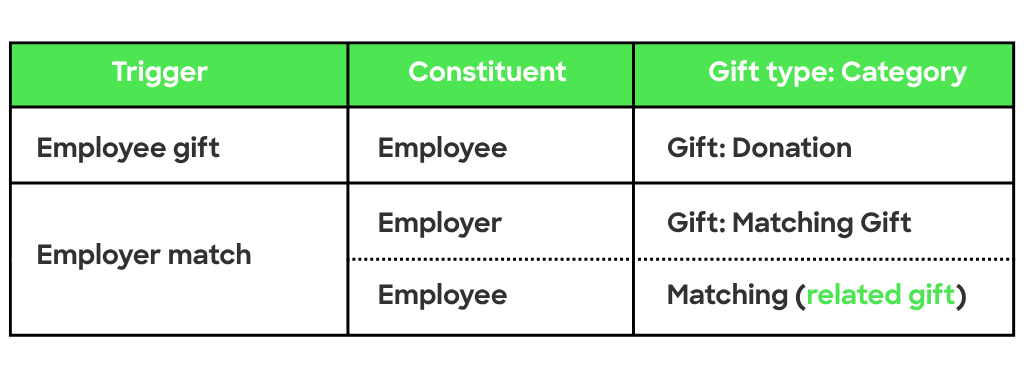
Recording matching gifts in LGL allows you to recognize the employee for the matching gift given by their company. But, of course, you don’t want to double count the company’s gift in your fundraising totals. The solution is to use a related matching gift record. A related gift is a way to record a gift on a constituent’s record that keeps it separate from their direct giving.
In a typical situation where an employee makes a gift and their company provides a match, you should record three gift entries: two hard credit gifts (one for each direct contribution) plus a related matching gift on the employee’s record to represent the company’s donation:
Things can get more complicated when the company manages their matching gift program through workplace giving or a matching service. We recommend the following help articles to address those scenarios:
If you have the potential to obtain a large number of matching gifts (around 100 per year) then consider automating the process. It is time consuming to chase down potential matches, but there are software services that can help, like Double the Donation.
Double the Donation has built an integration with LGL, which you can read about in our help article: Sync donations from LGL to Double the Donation.
On April 15 and 16, our partner Double the Donation is hosting a free, virtual fundraising conference designed specifically for nonprofits and schools looking to grow revenue and elevate their workplace giving programs. Click the button below for more information and to register:

Conclusion
Managing matching gifts can certainly get complex, but even small nonprofits can take steps to begin collecting company matches. The key is to keep the size of your efforts aligned with the potential return.

Ready to try LGL? Get your first 30 days free. No credit card required.