Little Green Light is a cloud-based donor management system for fundraisers.
Subscribe to get our latest product updates, best practices and tips to grow your nonprofit.
If working in your donor management software feels like one of many priorities competing for your attention, remember that your data is a valuable resource for nurturing meaningful relationships with your constituents. LGL’s features are designed to help you along the way.
LGL Forms can be used to collect online gifts, event registrations, newsletter signups, and more. When someone completes a form, they are initiating an interaction with your organization. If a single team member is tasked with reviewing and saving form submissions, the rest of your team might be missing out on important opportunities to complete, or help steward, these interactions. That’s why we recommend using internal notification emails to keep your team updated on the data flowing through your forms.
Note: Even if not all of your colleagues directly use LGL, you can still notify them about form submissions when you add their email address to the “Approved Emails” section on the LGL Forms > Admin > Users page.
Reaching out to donors personally when they make a gift is a great stewardship practice. These one-on-one conversations show donors they are valued, increasing the likelihood that they will give again in the future. You can use Little Green Light’s Tasks feature to keep track of stewardship action items, and you can map your online giving forms to create task records for you.
To add a task record when mapping a form, click “Add record type” and choose “Tasks”:
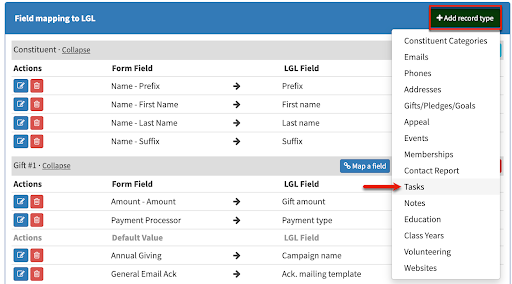
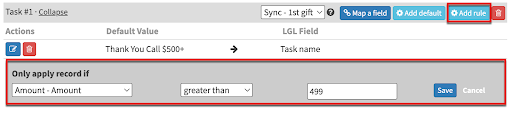
The only field that is required to create a task is the task name, which you can do by setting a default in the mapping. If you determine that tasks should be created only when someone gives above a certain amount, you can set a conditional rule on the record level that will exclusively apply the task when the condition is met:
We recommend creating contact reports to record important one-on-one interactions, like sending a personal email to thank a donor for their gift. You’ll be able to see a history of your outreach alongside other activity in LGL, and this will put your team in a better position to recall details about your constituents. The Email Dropbox feature can be enabled in all LGL accounts, and it will allow you to create contact reports by bcc’ing or forwarding email to your LGL Dropbox so that you can multi-task without even needing to log into LGL.
Conclusion
Stewarding long-term relationships is essential for long-term success, and improving donor stewardship can start with these small tweaks to the ways you use your donor management system.
Check out our LGL Pro Tip Archives for even more ideas!

Ready to try LGL? Get your first 30 days free. No credit card required.